

The Price table is for prices that change along a second axis: by stylist level, by member and non-member, by how many weeks since the last fill. The Service menu lists one price per service; the price table lists up to four.
Two block types
- A Group block is a heading row: Group name and an optional Group note, for example Cuts, with a note that every cut includes a wash.
- A Row block is a service: Name, a Note under it (usually the duration) and a value per column, Column 1 value to Column 4 value. Values are text: $45, $45+, from $45, or blank to show a dash.
Blocks render in the order they sit in the sidebar, so put a Group block before the rows that belong to it.
Price table section
Every setting, with its control and default- Color schemeColor scheme · Scheme 1
- Full widthCheckbox · Off
- Section paddingChoice: None, Small, Regular, Large · Regular
Heading
- EyebrowText
- HeadingText · Prices
- Intro textRich text
- AlignmentChoice: Left, Center · Left
Columns
- Price columnsSlider: 1 to 4 · 2
- First column labelText · ServiceThe heading over the row names, for example Service or Set.
- Column 1 labelText · Stylist
- Column 2 labelText · Senior
- Column 3 labelText
- Column 4 labelText
- Highlight columnSlider: 0 to 4 · 0Shade one column, for example the member price. 0 highlights nothing.
- Menu styleCheckbox · OffDotted leaders between the service and its price, like a printed menu. Best with one column.
- Keep column labels in viewCheckbox · OnColumn labels stick to the top while a long table scrolls. Rows stack into cards on phones.
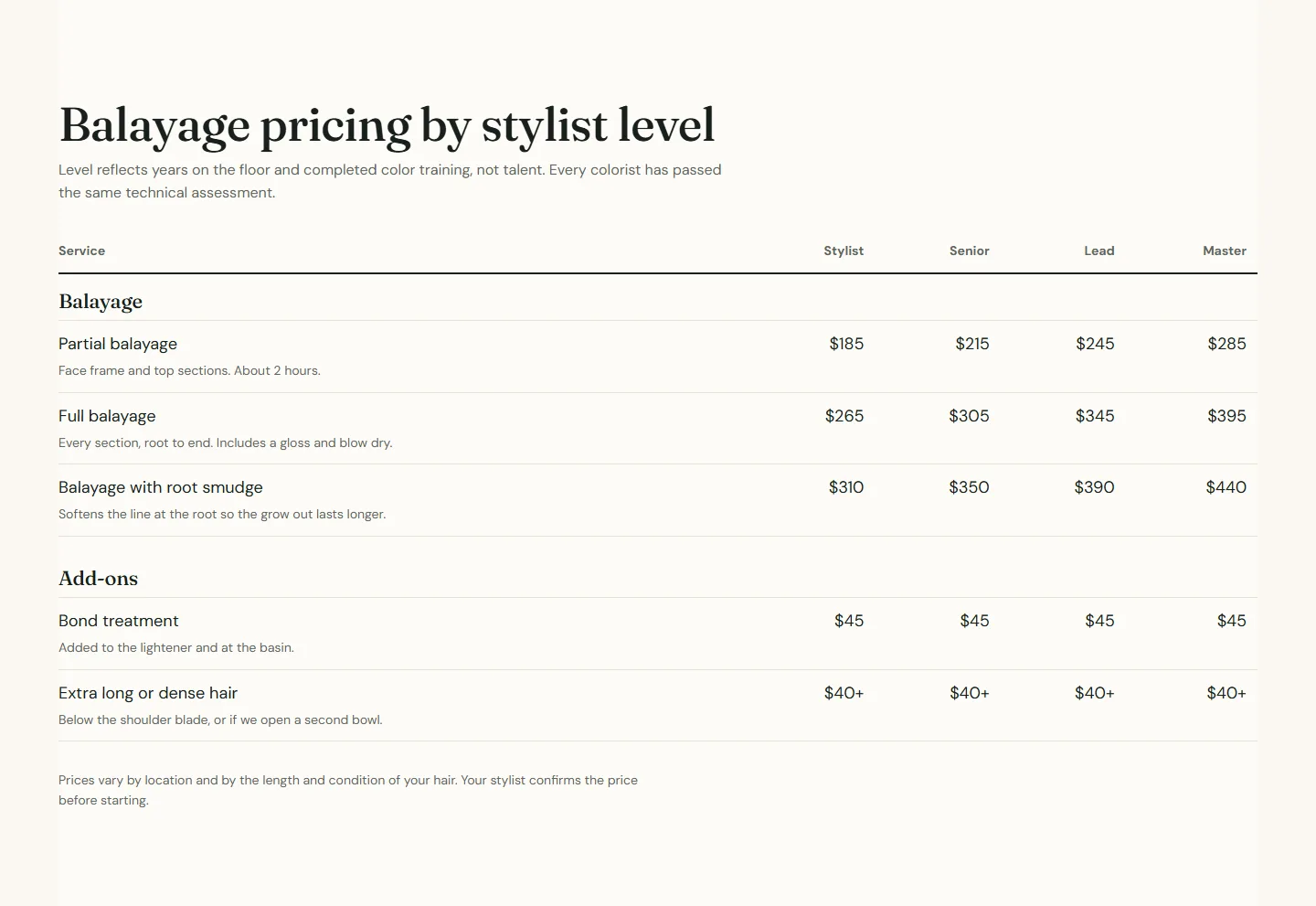
- FootnoteRich text · Prices vary by location and by the length and condition of your hair. Your stylist confirms the price before starting.
Booking
- Show a book button on each rowCheckbox · Off
- Location nameTextSent with every booking link for analytics.
- Booking center IDTextThe provider ID for this location. Leave blank to use the default from theme settings.
Group block
Up to 50 blocks in the section- Group nameText · Cuts
- Group noteText
Row block
Up to 50 blocks in the section- NameText · Classic cut
- NoteTextShown under the name, for example the duration.
- Column 1 valueTextType the price as you want it to read, for example $45, $45+ or from $45. Leave blank to show a dash.
- Column 2 valueText
- Column 3 valueText
- Column 4 valueText
Booking
- Booking IDTextThe provider ID for this service, category, package or membership.
- Booking link typeChoice: Service, Category, Package, Membership, Generic booking page · Service
- Custom linkLinkOverrides the booking link when set.
Columns
- Price columns, 1 to 4, is how many value columns the table shows.
- First column label is the heading over the row names, for example Service or Set.
- Column 1 label to Column 4 label name the columns: Stylist, Senior, Lead, Master; or Member, Non-member; or 1 week, 2 weeks, 3 weeks.
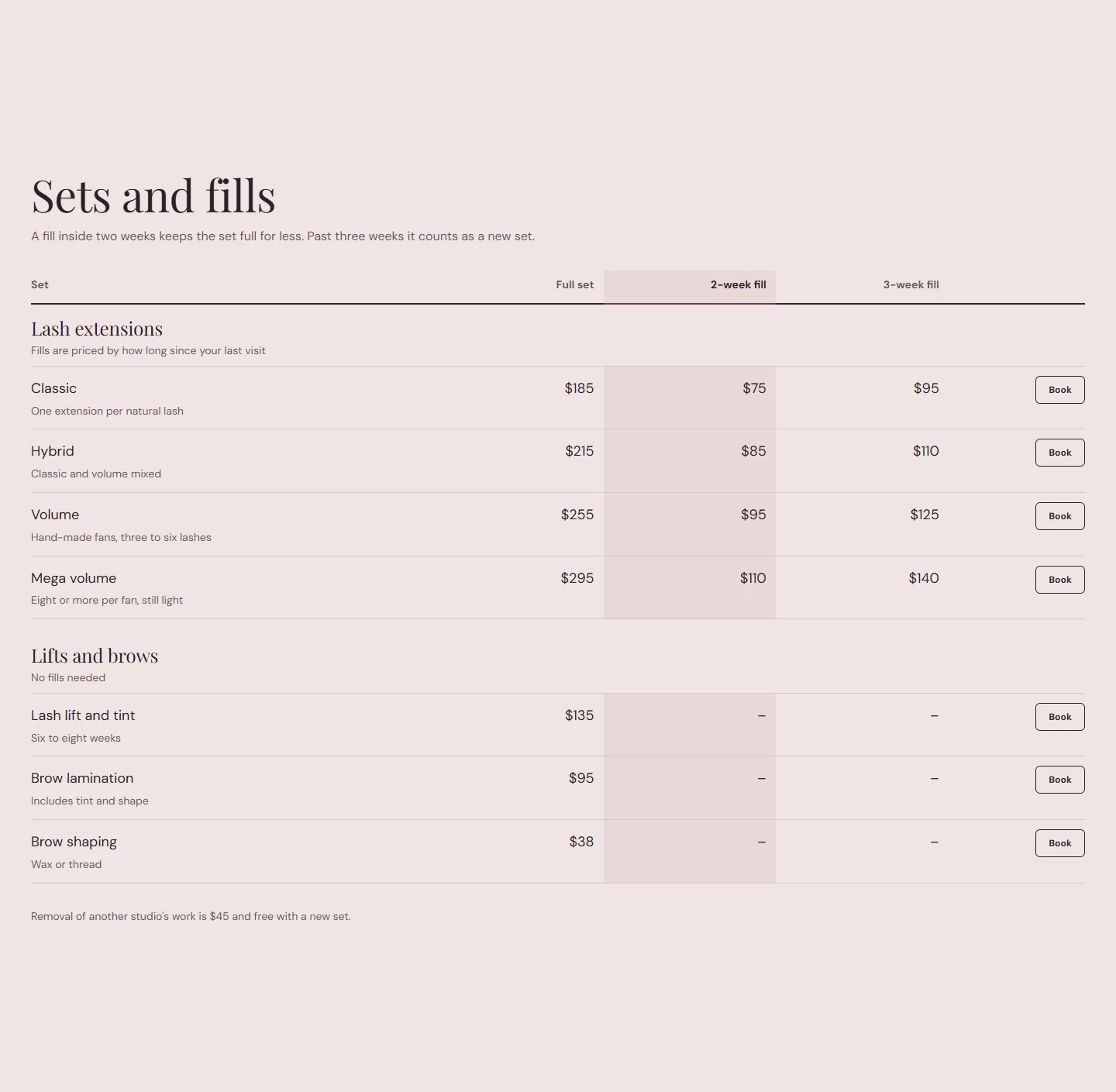
- Highlight column shades one column, for example the member price or the two-week fill. 0 highlights nothing.
- Menu style puts dotted leaders between the service and its price, like a printed menu. Best with one column; the Barber preset uses it.
- Keep column labels in view keeps the column labels stuck to the top while a long table scrolls. On phones the rows stack into cards with the column label beside each price, so the table never scrolls sideways.
- Footnote is rich text under the table for the pricing rule.
Price table section
Every setting, with its control and default- Color schemeColor scheme · Scheme 1
- Full widthCheckbox · Off
- Section paddingChoice: None, Small, Regular, Large · Regular
Heading
- EyebrowText
- HeadingText · Prices
- Intro textRich text
- AlignmentChoice: Left, Center · Left
Columns
- Price columnsSlider: 1 to 4 · 2
- First column labelText · ServiceThe heading over the row names, for example Service or Set.
- Column 1 labelText · Stylist
- Column 2 labelText · Senior
- Column 3 labelText
- Column 4 labelText
- Highlight columnSlider: 0 to 4 · 0Shade one column, for example the member price. 0 highlights nothing.
- Menu styleCheckbox · OffDotted leaders between the service and its price, like a printed menu. Best with one column.
- Keep column labels in viewCheckbox · OnColumn labels stick to the top while a long table scrolls. Rows stack into cards on phones.
- FootnoteRich text · Prices vary by location and by the length and condition of your hair. Your stylist confirms the price before starting.
Booking
- Show a book button on each rowCheckbox · Off
- Location nameTextSent with every booking link for analytics.
- Booking center IDTextThe provider ID for this location. Leave blank to use the default from theme settings.
In the theme editorPrice table section with the Columns group open. The settings sheet on this page lists every control in that panel by its label.
Booking
- Show a book button on each row adds a Book button to every row. Rows with a Booking ID book that service; the Booking link type is Service, Category, Package, Membership or Generic booking page. Custom link overrides the built link.
- Location name and Booking center ID apply to every row, as on the service menu.
Three ways the demo uses it
- Stylist levels on the Balayage page: four columns, Stylist to Master, no highlight.
- Barber menu on the Barber preset home page: two columns, Barber and Master barber, Menu style on.
- Fill matrix on the Lash preset: three columns by weeks since the last fill, Highlight column 2, a Book button on every row, and the full set price in each Group note. The Lash preset ships this as the Lash fill matrix preset of the section, so you can add it with the table already filled.
Member pricing
Set Price columns to 2 with labels Member and Non-member, Highlight column 1, and add a Footnote that links to your memberships page. The Plans section on that page takes the guest the rest of the way.