

The Location finder is the section for your locations page. Guests search by name, area, address or postal code, filter by region, or press one button to sort by distance from where they are. Nothing calls a map service: the sort uses the browser's own location permission and the coordinates you type into each block.
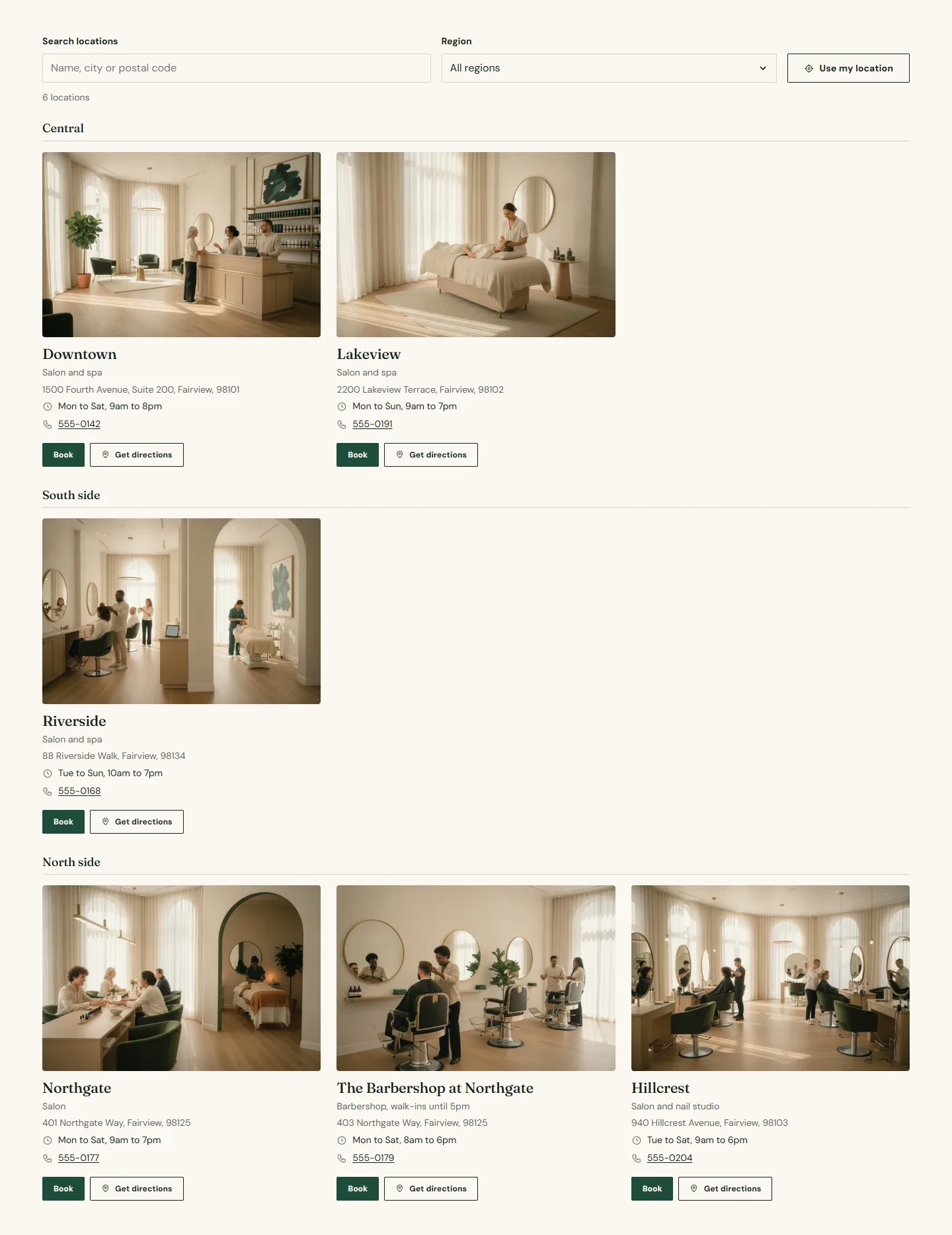
Heading
Eyebrow, Heading, Intro text and Heading alignment.
Search and filters
- Show search box matches what the guest types against the name, area, region, address and postal code of each location.
- Show region filter builds a dropdown from the Region field on the blocks. Hidden when every location shares one region.
- Show the Use my location button sorts locations by distance from the guest, with their permission, using the browser only. It needs Latitude and Longitude on each block; locations without coordinates sort last.
- Distance unit is Miles or Kilometers for the distance shown on each card after sorting.
Layout
- Layout is Grid or List beside a map. The map is a Map image you export from your map provider, shown beside the list; it is a static image, not a live map.
- Columns on desktop 2 or 3 for the grid.
Location finder section
Every setting, with its control and default- Color schemeColor scheme · Scheme 1
- Full widthCheckbox · Off
- Section paddingChoice: None, Small, Regular, Large · Regular
- EyebrowText
- HeadingText · Find your nearest salon
- Intro textRich text
- Heading alignmentChoice: Left, Center · Left
- Show search boxCheckbox · OnMatches the name, area, region, address and postal code of each location.
- Show region filterCheckbox · OnA dropdown built from the Region field on each location. Hidden when every location shares one region.
- Show the Use my location buttonCheckbox · OnSorts locations by distance from the guest, with their permission, using the browser only. Needs latitude and longitude on each location. No map service is called.
- Distance unitChoice: Miles, Kilometers · Miles
- LayoutChoice: Grid, List beside a map · Grid
- Columns on desktopChoice: 2, 3 · 3
- Map imageImageShown beside the list in the list layout. A static image, not a live map.
Location blocks
Up to forty.
- Image, Name, Area (the neighborhood or the services offered) and Region (a state, county or city that groups locations together).
- Address line, ZIP or postal code, Phone number and a one-line Hours summary such as Mon to Sat, 9am to 7pm.
- Latitude and Longitude in decimal degrees, for example 47.6108 and -122.3363. Copy them from your map provider: in most map sites, right-click the pin and the coordinates appear.
- Location page, Directions link, Booking center ID and a Booking link that replaces the built booking link for locations on another provider.
Location finder section
Every setting, with its control and default- Color schemeColor scheme · Scheme 1
- Full widthCheckbox · Off
- Section paddingChoice: None, Small, Regular, Large · Regular
- EyebrowText
- HeadingText · Find your nearest salon
- Intro textRich text
- Heading alignmentChoice: Left, Center · Left
- Show search boxCheckbox · OnMatches the name, area, region, address and postal code of each location.
- Show region filterCheckbox · OnA dropdown built from the Region field on each location. Hidden when every location shares one region.
- Show the Use my location buttonCheckbox · OnSorts locations by distance from the guest, with their permission, using the browser only. Needs latitude and longitude on each location. No map service is called.
- Distance unitChoice: Miles, Kilometers · Miles
- LayoutChoice: Grid, List beside a map · Grid
- Columns on desktopChoice: 2, 3 · 3
- Map imageImageShown beside the list in the list layout. A static image, not a live map.
Location block
Up to 40 blocks in the section- ImageImage
- NameText · Downtown
- AreaText · Salon and spaA short line under the name, for example the neighborhood or the services offered.
- RegionTextGroups and filters locations, for example a state, county or city. Locations with the same region sit together.
- Address lineText · 1500 Fourth Avenue, Fairview
- ZIP or postal codeText
- Phone numberText
- Hours summaryTextOne short line, for example Mon to Sat, 9am to 7pm.
- LatitudeTextDecimal degrees, for example 47.6108 and -122.3363. Copy them from your map provider. Powers the Use my location sort.
- LongitudeText
- Location pageLinkThe page that holds this location's hours, team and service menu.
- Directions linkLinkPaste the share link from your map provider.
- Booking center IDTextThe provider ID for this location. Leave blank to use the default from theme settings.
- Booking linkLinkPoint at another booking provider. It replaces the built link.
Three lists of locations
The finder, the home page Locations grid and the Booking picker each hold their own blocks. The grid is a shorter card list without search, for the home page and the Also nearby row on location pages. The picker is the dialog that opens when a Book button has no location. Keep the names and center IDs the same in all three.